You can force Twitter to post the “raw” quality of your pics by adding one (1) pixel of transparency in the image.
Twitter uses some algorithm to compress images into .jpg, but it cannot do that if there’s transparency involved in the image, forcing it to be .png in its full quality. Literally one singular pixel ANYWHEREcounts for this, it can be on a corner if you don’t want it to be bothersome.
Figured some folks might be interested in this, considering Tumblr no longer supports the _raw trick.
For the sake of example instead of hearsay, I’ve posted a comparison in my Twitter here, but will also explain here. All images are 2000x2000px versions of my logo you can see on the top left of this post:
replying is how you make friends! reply to anything you want and be friendly. don’t make rude jokes if you’re not friends already though!
quote retweeting is a no-no. when you “retweet with a comment” it’s not liked by content creators because it makes a new tweet out of their tweet and they don’t get the likes and retweets they would get if you’d just retweeted it straight up. if you want to comment on a retweet, reply to it or post a new tweet starting with “LRT” which stands for “last retweet” (it’s fine to quote retweet dumb memes and so on.)
you can make your tweets private. this means no one but your followers will be able to see what you post and no one will be able to retweet your content. you can switch back and forth between private and public at will. some people make a separate private account to tweet personal stuff and let mutuals follow it only. it’s a good way to keep things separate.
what is privatter? privatter is a third party web app that content creators can allow to be attached to their twitter. it lets them tweet content that they can make exclusive to logged in users, followers, mutuals, or a specific list of users. as long as you are logged in to twitter and fall into the intended category, you’ll be able to see it.
you can mute people you follow. (and those you don’t, ofc.) you can also mute words and phrases and entire conversations. if you mute someone you follow and they reply to you, that reply will still show up in your notifications. it’s a good way to keep the peace!
you can limit notifications to people who follow you or to mutuals. (notifications from people you follow will still show up regardless of which option you’ve selected.)
miscellaneous tips and warnings: if you accidentally unfollow and refollow someone, it won’t show up in their notifications as long as it’s within a couple minutes. no more accidental stuff. everyone can see who everyone follows so watch out. people will know if you unfollow. if you want to report someone and want them gone forever, report a tweet where they used a curse word. screenshotting tweets for harassment is a no-no and can get you banned. don’t be lame. don’t be a dick. vaguing others is generally really bad form and so is complaining about content within a fandom you’re in. use the mute tools at your disposal and don’t be a spoiler. you won’t come back from a rep like that and everyone sees everything.
that’s it! happy tweeting!!
how do i keep all my content together on twitter?
threads are your best friend!! you make a tweet with your commission info and links and so on and pin it to the top of your page. then reply to that tweet with a copy and pasted link to the tweet where you posted the art/fic/etc you want to not lose. reply to that new tweet with the next piece of artwork and so on. you can also make a unique hashtag for your content to use when you post, so that when you search that hashtag later you’re able to see just your art. good luck!
Oh this is good to know. I have no idea how twitter works really.
Yes. Except I totally do not mind if you quote retweet me. I tend to do that to when I rec someone – their dj, merch, services etc… if asked I wont of course.
First, a note: I ask that people please reblog this to spread this since the tags are kinda unusable right now, especially when a post has external links within it.
Dreamwidth has been my main active posting platform for a year and a half now, and I’ve noticed a lot of bloggers talking about jumping ship over to DW with tumblr’s uhhhhhh current state of affairs.
But DW is kinda bland and boring if you’re too young to have been of the LiveJournal generation, and therefore don’t know where to look or start in order to build your friends list and find communities, so I’m going to do some of the legwork for you.
the_great_tumblr_purge: I made a dw community specifically for people jumping ship from tumblr to reconnect with each other.
addme: a friending community where you pimp yourself out and find other people with similar interests that you might want to see on your reading page.
addme_fandom: similar to above, only with a stronger emphasis on finding people based on your fandoms.
fandomcalendar: a community where you can find fandom events, such as big bangs, exchanges, challenges, bingos, etc. and other fandom communities that might suit your interests.
this post will be updated as I find more websites to add! please check with the original before reblogging to see if there’s an updated version, and message me with more suggestions if you have them!!
for general use
myspace.com – yes, it still exists, i’m just as surprised as you
soup.io – very similar to tumblr, plus it can import your tumblr blog
twitter.com – allows posting both text and photos in sets, allows retweets
livejournal.com – still an option, but questionably safe for fandom
wordpress.com – old and well-established, often considered the default
geared towards artists and photographers
deviantart.com – huge community, allows posting art + sorting into folders
flickr.com – great community for photographers, can join groups
furaffinity.net – similar to DA but for furries, easy to display commish info
instagram.com – photo and video posts, excellent tag search
piczel.tv – allows both streaming and posting art / photosets to a gallery
pixiv.net – huge anime art community, allows livestreaming
paid platforms
patreon.com – subscription-based access to many diff types of content
pillowfort.io – still in beta, but should function almost identically to tumblr
typepad.com – similar to wordpress but with reblogging and a dash
ways to save your current tumblr posts
use the wayback machine! you do have to archive each page of your blog individually but once you do all the content, including media, will be saved exactly as it was at the moment you archived it.
wordpress and soup both allow you to directly import whole tumblr blogs, and if i recall correctly it’s something both dreamwidth and pillowfort have said they are working on.
if you have some knowledge of computers you can try this github solution which uses a python script to download your whole blog to your computer.
even if you don’t know anything about programming or the command line
they give a very good beginners tutorial on how to use it so you should still give it a shot!
Soup.io – well-known alternative to Tumblr. Reblogging, post types, themes, collab blogs, dashboard, artsy, great community already there. Soup can auto-import everything you’ve posted on Tumblr.
TypePad – Includes reblogging. Dashboard and post types similar to Tumblr.
Alright, by now plenty of you are aware that Tumblr has decided to axe (most) NSFW content from its site. Here’s their statement, in case you haven’t seen it yet. Figured I’d address some of it before I start migrating.
What’s happening?
Tumblr is drastically altering its policy on NSFW content. The change will be enacted in December 17, 2018.
Is all NSFW content forbidden now?
Not quite – their new terms state that all sexual content featuring real people (i.e. photos and videos of a sexual nature, including non-artistic nudity) is forbidden. However, illustrations are only explicitly stated as forbidden if they “display sexual acts”. Written erotica is specifically mentioned as allowed.
So, written smut, and NSFW art that doesn’t feature sex acts would in theory still be allowed. Weirder fetish stuff that can’t immediately be catalogued as explicit could also fly under the radar.
However, the site has also seen a change to its search and tagging functions, which means that even if you continue to produce the above-mentioned allowed content, you are likely to have your blog tagged as explicit, which would take it off search results (both through tumblr search and via google). In practice, even if your NSFW content is not outright banned, there’s no incentive to post it, as you will likely gain no followers.
Why are they doing this?
The official statement mentions a desire to foster a more welcoming community and a safer place to be yourself, yadda yadda. Also, this would supposedly be something they’ve been planning for a long time.
The more likely explanation, however, is related to Tumblr recently being kicked out from mobile apps due to their blatantly incompetent job at monitoring adult content – specifically the presence of child pornography, though the massive influx of porn spambots has also been mentioned.There’s a good chance they found proper monitoring too expensive, and cutting off NSFW content entirely had the added bonus of making the site more ad-friendly, which is desperately needed in a company that has failed to turn up a profit after being bought by Yahoo.
Any chance they’ll retract?
Unlikely. I mean, Patreon did recant an extremely impopular announced change to their payment system due to massive user outcry, so it’s not outside the realm of possibility. Feel free to contact Tumblr support about it (be polite, but if you plan to stop using the site due to this change, make sure to say so). But I wouldn’t put my money on it.
So where do we go now?
That’s the question! A lot of alternatives have been mentioned in the past few weeks. I might do a follow-up on this post later with some more details, but for the time being, here are some alternatives:
PILLOWFORTis a tumblr-like platform that’s currently still in beta. In addition to that, by the time I was writing this post their site was down due to maintenance. However, I’ve seen some good things said about it, so if they manage to get the site running soon, give it a try. You need a $5 key to enter the beta, though you can find some folks giving them away here and there. Try checking the notes on their Tumblr page (lmao)
TWITTER is also a popular option. A lot of your favorite NSFW artists might be posting there already (here’s mine!). Twitter’s image compression and timeline format make it far from ideal for posting art, but these problems tend to be offset by the massive audience.
MASTODON is largely known as “twitter minus the nazis”. I’ve found the interface a bit tricky to get into, but it’s something to consider if you want more control over your timeline, since it has some features that could be pretty useful if you want to keep your horny off main. Still nowhere near the userbase Twitter has, though.
Booru galleries like Gelbooru or Danbooru offer huge amounts of views, but posting your own content is frowned upon, reposting other people’s works without credit is rampant, and engagement is extremely low. I don’t particularly recommend them.
If by any chance you’re a furry NSFW artist, you’re probably in a better position than, uh, non-furries. Skinnies. Humanies. Fur muggles. I’m not in the furry community myself, but most NSFW artists know that furry sites offer much better engagement than most NSFW sites open to the general public. Then again, it’s extremely unlikely you’re not already a member, so I’ll skip mentioning them. Feel free to add them in the notes if you think it’d be helpful!
NEWGROUNDS allows NSFW content with no particular restrictions. However, bear in mind that its current userbase is far removed from the community you might have been accustomed to on Tumblr.
HENTAIFOUNDRY is a site for general adult art. (here’s mine!) Despite the name, it’s open for all drawn smut, regardless of style. However, keep in mind it has a quality filter (and corresponding submission queue), its userbase has been declining as of late, and, just like Newgrounds, might not be an audience fit, depending on the content you’re creating/interested in.
If getting started on all these sites seems overwhelming, I suggest giving POSTYBIRB a try – it’s a simple program that allows you to post on multiple sites simultaneously, saving you a lot of time.
That’s all for now! Uh, be sure to reblog this if you think it’d be useful, since this post won’t show up on searches.
WHY DID NO ONE TELL ME ABOUT PRO WRITING AID BEFORE?! THIS THING IS FUCKING GLORIOUS. HOLY SHIT. LOOK AT THIS.
IT GIVES YOU A WHOLE DAMN REPORT ON YOUR WRITING AND WALKS YOU THROUGH HOW TO MAKE IT BETTER AND WHY IT IS SUGGESTING CHANGES. THIS IS JUST A TINY CHUNK OF THE HUGE REPORT IT GAVE ME ON THE FIRST CHAPTER OF ONE OF MY PROJECTS. I AM IN LOVE.
AND IT WORKS WITH SCRIVENER. AND IT IS AFFORDABLE.
WHY DID NO ONE TELL ME?!
Seriously, a couple hours with this and my first chapter is so much better. It helped me see problems I KNEW I had (passive voice, showing vs. telling, adverbs) but was having a hard time sussing out. It has made editing so much more fun and easy because now I know what the hell I’m doing and what to look for instead of stumbling around blind shouting “adverbs? adverbs?” like a town crier. I can already tell I’m getting better at seeing things without the program having to show me too.
you ever see an image and think “i may see something as funny as this again, but never anything funnier”
ALL RIGHT YOU LITTLE SHITS GET READY TO LEARN SOMETHING
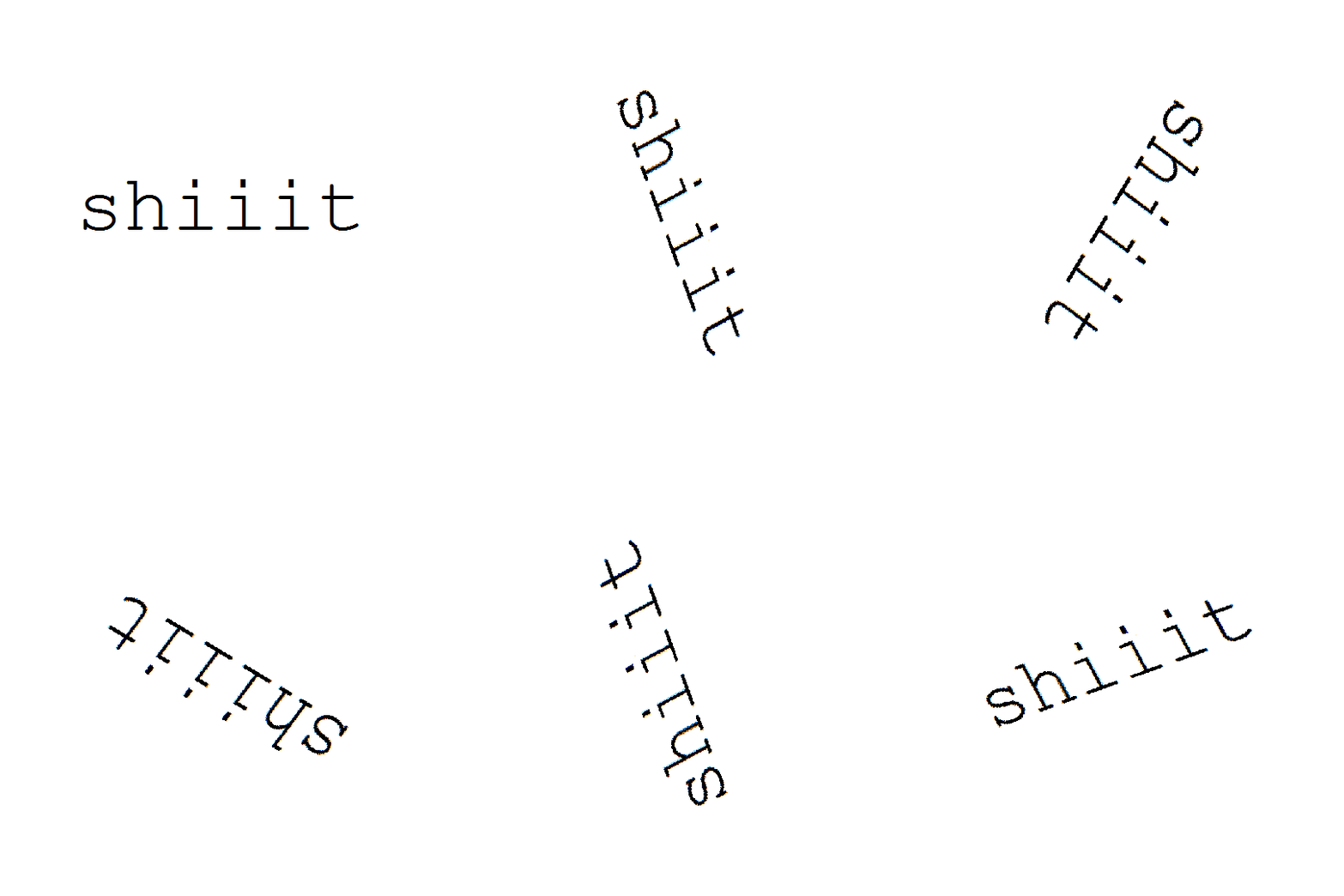
yOU WANNA ROTATE TEXT?! well mod 5ider has got the fucking t r i c k s homie
Step one: Type something.
P E R F E C T.
sTEP TWO: FIND THE RESIZE OPTION.
You see that little resize button on your menu?
Yeah, that’s the one. you can just click that shit!
On older versions of MS Paint there isn’t this option, but you can always find it with a quick right-click.
THERE IT FUCKING IS!!!!!
STEP THREE: STRETCH AND SKEW
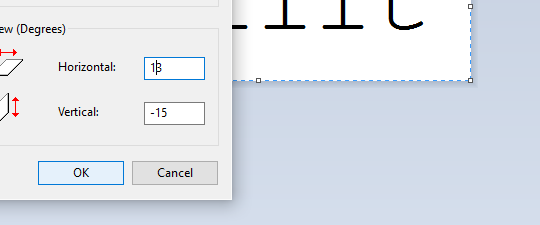
When you click resize, this menu comes up.
I’m sure you all have seen this menu before, but for those who don’t, I’ll clue you in. The top options control the length and respective width of your artwork. you can choose to alter them separately,
or all together
Using that little “Maintain Aspect Ration” checkbox there, but that’s not important right now.
wHat we’re focusing on is that skew option on the botttom.
with that you can t i l t whatever image yuo have on your screen to the left
to the right
up
and down.
“BUT 5IDER!!!!!” you say, “THAT DOESN’T LOOK ROTATED AT ALL”
wELL HOLD ON TO YOUR LUG NUTS BECAUSE I T ’ S T I M E F O R
STEP 4: ULTRA COMBOOOOOOOO!!!!!
now, comes the fun part. unlike its aspect ratio locked cousin, the stretch and skew options work independently from one another. So, you can do things like
and
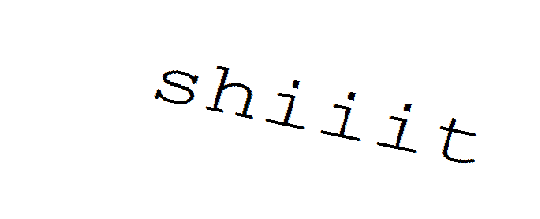
But that’s neither here nor there… what gets REALLY interesting is when your ratios are in opposite directions..
HOME RUN!
Now, before I let you go, I found out through trial and error that an angle doesn’t exactly match up with its negative dimension…
(Step 5: Angular ratios)
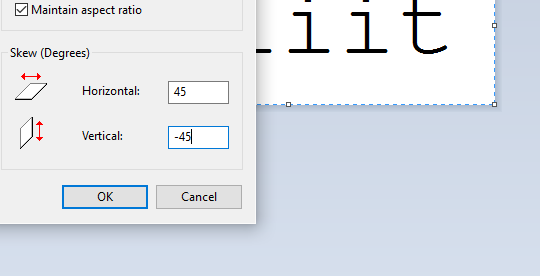
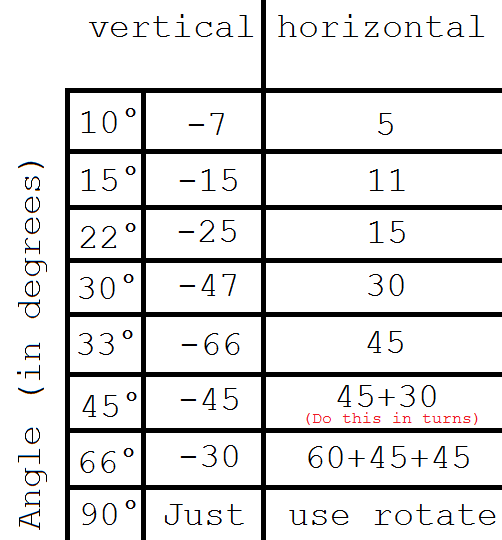
See? there’s a little offset between vertical and horizontal if your expect your text to appear natural instead of tilted. The only places that this offset reaches zero is at 90° (of course) and the rare and extremely dangerous 45° rotations.
Fortunately, I’ve already mapped out a few angles that I find are very useful in my works so, for your viewing pleasure… i present my handy dandy graph
All you have to do is match up your desired angle up to its respective complement and you have quickly and efficiently rotated your first word in MS Paint.
Have fun!
You know, you guys really seemed to enjoy this post.
Should I do more MS Paint tutorials in the future?
I just learned that some websites use cookies to adjust prices. That is, if you visit a certain website a lot the price will increase.
You can tell if that’s the case by checking the same web page on a different browser if you have a different number of stored cookies for that site. I checked something on Chegg and it was $14.95 on Chrome, $19.95 on Firefox, and $16.95 on Safari.
The fix? Clear your cookies for that website.
Reblog, save a wallet.
Plane tickets almost always do this!
PLANE TICKETS DO THIS ALL THE DAMN TIME
When you’re looking for plane tickets and waiting for prices to drop, ALWAYS clear your cookies beforehand and switch between browsers. A friend of mine was looking for a flight and getting prices that were the CHEAPEST at $800-1000, I sent her a link for a round trip that was like $495, and it read as $900 on her computer because she had been hounding the airline site.
alternatively: avoid all this headache by using incognito when shopping for plane tickets, text books, etc
Hotel rooms are notorious for this, as well. Just like, go on incognito mode to look at these sites, saves u a lot of time & hassle.
Bruh I ain’t never know dis thank you man
I tell my momma about shopping for airplane tickets in incognito mode… I never even thought about hotels and text books!
hey, if you’ve ever wanted to learn how to make a gif but doing it traditionally in photoshop is too hard, you should look at this.
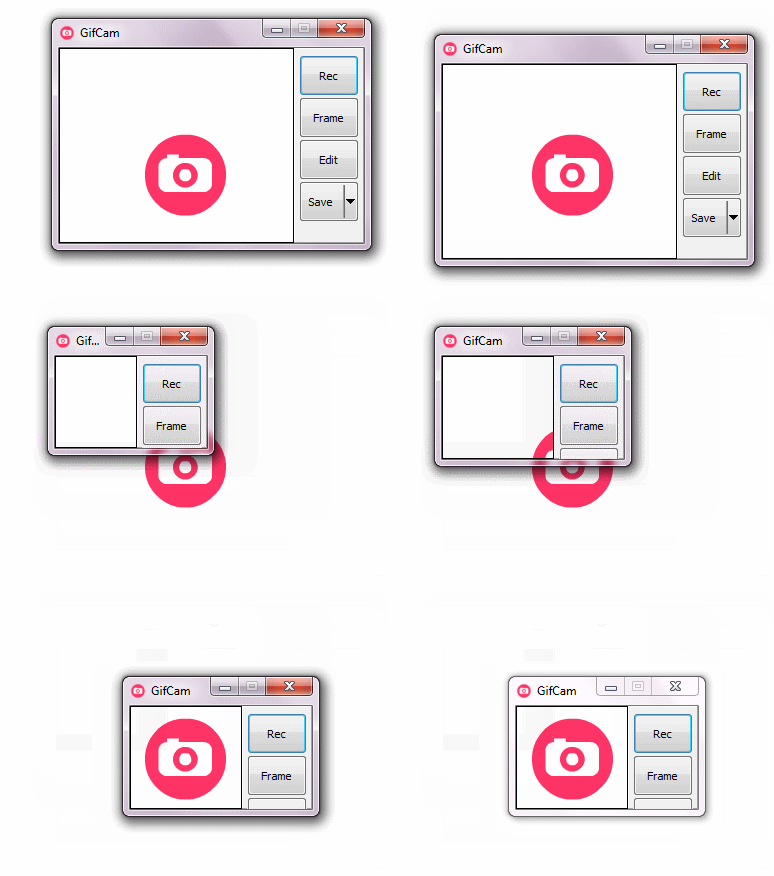
gifcam is an app designed to make making gifs easy. all you have to do to record a gif is size the window and hit record. it has a built in editor and it saves with low filesizes and many options.
the best thing about the whole deal is that its completely free. yeah. thats right. you wont pay for anything and you’ll never have to
you can download gifcam here, and if you want, you could reblog to spread the word about this awesome software
I have been given unreasonable power
i am too powerful now
I need this.
GIFCAM IS 100% SAFE AND FUN TO USE! IT’S A FANTASTIC TIME SAVER, TOO!
This is cool, but it is not supported by mac products!





 Time's Vengeance